Browser Engines - Digest

A JavaScript engine and a render engine are both important components of a web browser. However, they have different functions. This guide explores browser engines, their implementations, and specialized Firefox-based alternatives that offer enhanced privacy, performance, and customization options.
JavaScript Engine
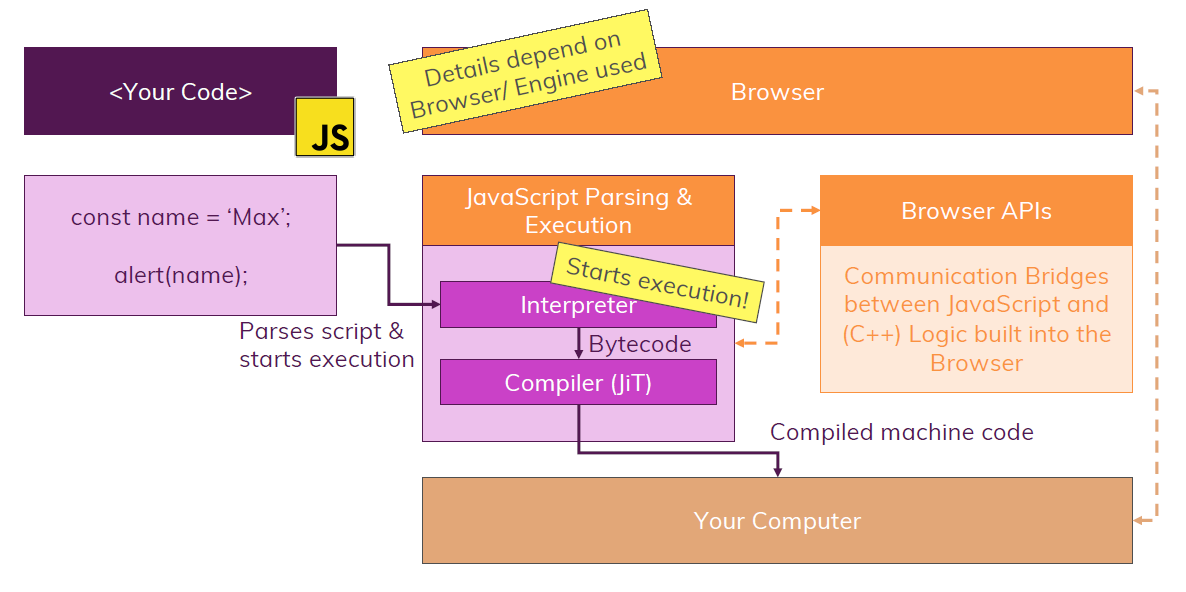
A JavaScript engine is responsible for executing JavaScript code. JavaScript is a programming language that is used to add interactivity to web pages. When a web page contains JavaScript code, the browser's JavaScript engine is responsible for parsing and executing JS code. It uses JIT compilation for improved performance.
Render Engine
A render(rendering) engine is responsible for displaying the content of a web page on the screen. This includes the HTML, CSS, and JavaScript code. The render engine takes the code and converts it into a visual representation that can be displayed on the screen. In browsers, it works in conjunction with the JavaScript engine via the DOM(Document Object Model). A rendering engine is also known as a browser engine or layout engine. A browser engine is a core software component of every major web browser.
| Browser | Browser Engine | JS Engine |
|---|---|---|
| Google Chrome 28+ | Blink | V8 |
| Mozilla Firefox | Gecko | SpiderMonkey |
| Apple Safari | WebKit | JavaScriptCore(Nitro) |
| UC Browser (Legacy) | U3 Engine | Not known |
| Internet Explorer 11 | Trident | Chakra |
| MS Edge 18 (Legacy) | EdgeHTML | Chakra |
| Opera 14 (Legacy) | Presto | Futhark & Carakan |
| Chromium Based | Blink | V8 |
Firefox-based Gecko Browser Alternatives
While Mozilla Firefox is the most well-known browser using the Gecko engine, several alternative browsers have been developed as forks of the Firefox codebase. These browsers often focus on user privacy and customization, though some like Pale Moon have diverged significantly and are not always secure due to not receiving modern Gecko engine security updates.
| Browser | Engine | Focus/Specialty | Security Status |
|---|---|---|---|
| LibreWolf | Gecko (Modern) | Privacy & Security | ✅ Regular security updates |
| Waterfox | Gecko (Modern) | Legacy Support & Performance | ✅ Regular security updates |
| Tor Browser | Gecko (ESR) | Anonymity & Privacy | ✅ Regular security updates |
| Zen Browser | Gecko (Modern) | Productivity & Aesthetics | ✅ Regular security updates |
| Pale Moon | Goanna (Fork) | Legacy Compatibility | ⚠️ Security concerns |
LibreWolf - Best for: Privacy & Security
LibreWolf is a hardened, privacy-focused fork of Firefox with all telemetry, tracking, and data collection disabled by default:
- uBlock Origin built-in – blocks ads and trackers out of the box
- Zero telemetry – no data collection or tracking
- Pre-configured privacy settings with strict defaults
- Enhanced security with additional hardening measures
- Regular updates synchronized with Firefox releases for security
Waterfox - Best for: Legacy Support & Performance Flexibility
Waterfox is designed for users who want performance and legacy compatibility:
- 64-bit optimized architecture for better performance
- Support for legacy Firefox add-ons (WebExtensions and legacy extensions)
- Faster startup times compared to standard Firefox
- Minimal changes to core Firefox functionality
- Available in Classic (legacy support) and Current (modern) versions
- Regular security updates from modern Gecko engine
Tor Browser - Best for: Maximum Anonymity & Privacy
Tor Browser, developed by the Tor Project, is a privacy-hardened browser built on Firefox ESR (Extended Support Release) with deep integration into the Tor network:
- Routes traffic through encrypted relays worldwide to conceal identity and location
- Zero telemetry – no data collection or tracking
- Pre-configured security settings to prevent tracking and fingerprinting
- NoScript and HTTPS Everywhere included by default
- Circuits isolation to prevent correlation of browsing sessions
- Regular security updates to maintain anonymity protection
Zen Browser - Best for: Productivity & Aesthetic Customization
Zen Browser is a modern reimagining of Firefox that focuses on minimalism, performance, and user experience:
- Workspace management for organizing different browsing contexts
- Advanced tab grouping and management features
- Modern, customizable interface with aesthetic enhancements
- Split-screen browsing capabilities
- Enhanced developer tools and productivity extensions
- Performance optimizations for faster browsing
⚠️ Pale Moon - Security Warning
Pale Moon is a long-standing fork that has diverged significantly from modern Firefox, using its own Goanna engine:
- Note: Pale Moon does not receive modern security updates, which may make it insecure, according to LinuxReviews
- Uses the Goanna engine (fork of Gecko) rather than current Gecko
- Legacy compatibility focus but at the cost of security
- Not recommended for security-conscious users due to outdated security patches
When choosing Firefox alternatives, prioritize browsers that receive regular security updates. Browsers like Pale Moon that have diverged significantly from modern Firefox may lack critical security patches and should be avoided for sensitive browsing.
All modern Firefox forks (LibreWolf, Waterfox, Tor Browser, Zen Browser) inherit Gecko's excellent web standards compliance and SpiderMonkey JavaScript engine performance while offering specialized features for different user needs.
- Edge 79+, Opera 15+, Brave, Vivaldi, etc are some example for chromium based browsers.
- Blink is a fork of the WebCore component of WebKit, which was originally a fork of the KHTML and KJS libraries from KDE.
- WebRender is a component of Gecko, the browser engine and is a GPU-based 2D rendering engine.
The Just-in-Time (JIT) paradigm
The most common way of transforming the code is by performing ahead-of-time(AOT) compilation. It works exactly as it sounds: the code is transformed into machine code before the execution of your program during the compilation stage. This approach is used by many programming languages such as C++, Java, and others.
To transform the code faster and more effectively for dynamic languages(JS), a new approach was created called Just-in-Time (JIT) compilation. It combines the best from interpretation and compilation. V8 uses an interpreter called Ignition. Initially, it takes an abstract syntax tree and generates byte code.

Sandbox
A sandbox is used to execute JavaScript in a browser. A sandbox is a security mechanism that isolates code from the rest of the system. This means that JavaScript code running in a sandbox cannot access the user's files or other resources on the computer.
Browsers use sandboxes to protect users from malicious JavaScript code. For example, if a website contains malicious JavaScript code, the sandbox will prevent the code from accessing the user's files or other resources.
Sandboxes are also used to improve the performance of browsers. By isolating JavaScript code from the rest of the system, browsers can execute the code more efficiently.
There are a number of different ways to sandbox JavaScript code in a browser. One common method is to use an iframe. An iframe is a HTML element that creates a sandboxed environment for executing JavaScript code.
Another common method for sandboxing JavaScript code is to use a web worker. A web worker is a JavaScript script that runs in the background, separate from the main thread of the browser. This allows the JavaScript code to run without affecting the performance of the browser.
JavaScript vs. Rendering Engine
- JavaScript engine executes code, while the rendering engine is responsible for displaying the web pages.
- Each browser uses its own JavaScript and rendering engine.
- JavaScript engine runs JavaScript code, while the rendering engine interprets HTML, XML, CSS, etc.
How code is parsed & compiled
JavaScript Engines & What They Do