Ollama: Usage Notes & Quick Reference

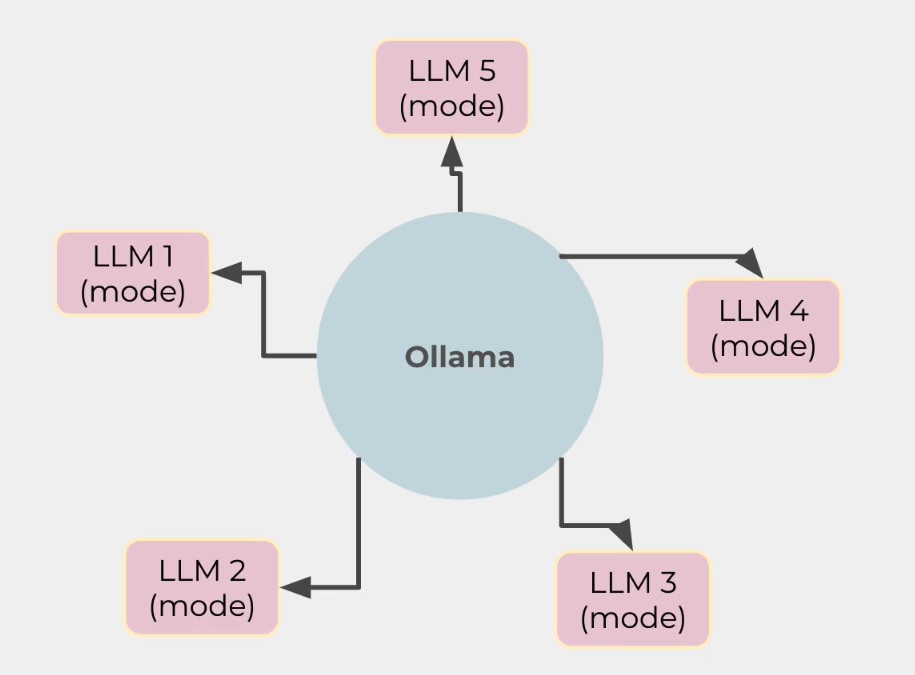
Ollama is an open-source tool that is designed to simplify the process of running large language models locally, meaning on your own hardware. The idea here is very simple. As you know, if you want to run large language models or use a model, most likely you will have to rely on paid services like OpenAI, ChatGPT, and others.
With Ollama, you don't have to pay for anything—it's free, and that's the beauty. Ollama sits at the center and allows developers to pick different large language models depending on the situation and their needs. At its core, Ollama uses a command-line interface (CLI) to manage backend tasks like installation and execution of different models, all of which run locally. Ollama abstracts away the technical complexities involved in setting up these models, making advanced language processing accessible to a broader audience, including developers, researchers, and hobbyists. In a nutshell, Ollama provides a straightforward way to download, run, and interact with various models or LLMs without relying on cloud-based services or dealing with complex setup procedures.
What problem Ollama Solves?
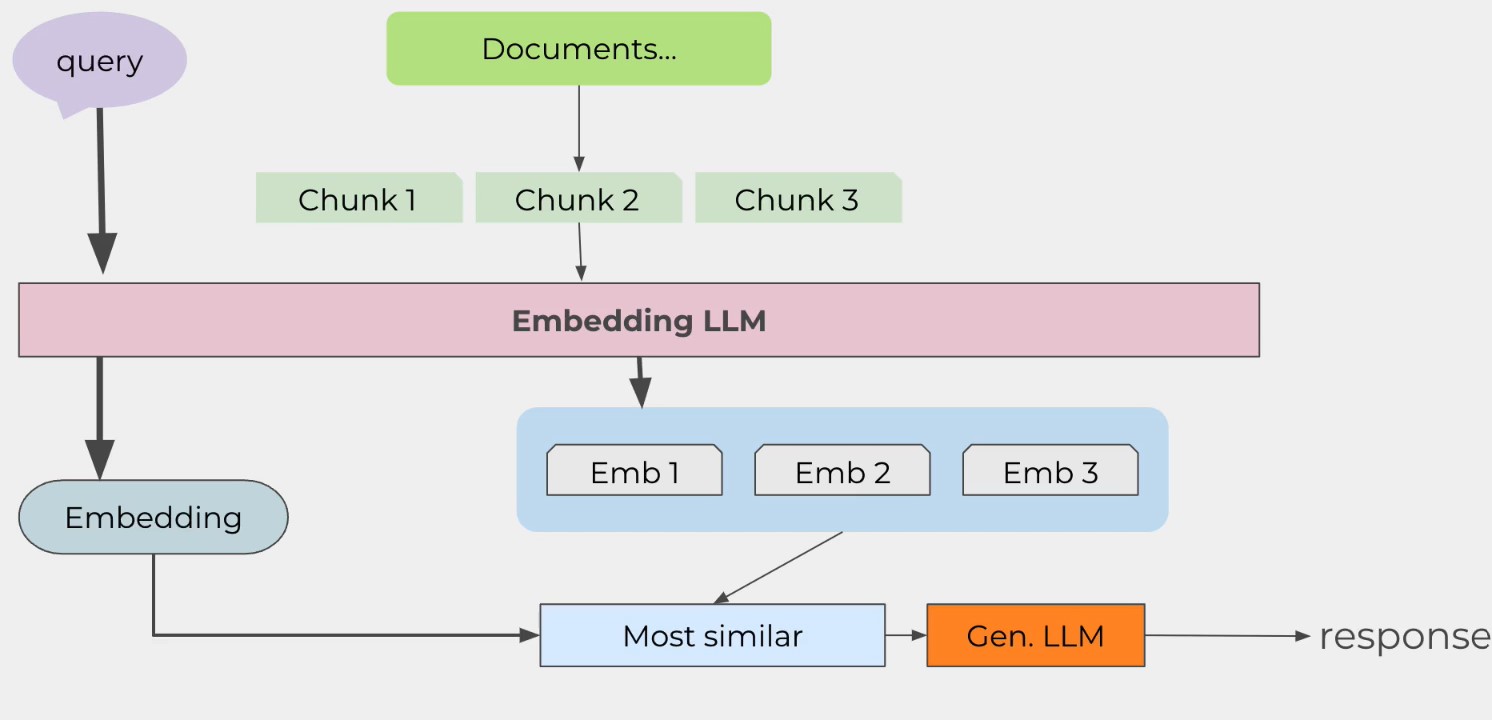
Now, when we talk about large language models, we are usually referring to RAG systems (Retrieval-Augmented Generation). The idea is simple: documents are chopped into smaller chunks, which are then passed through a model to create embeddings—vector representations of these chunks. These embeddings are stored in a vector database, and when a query comes in, it undergoes the same embedding process. The resulting embedding is used to perform a similarity search in the vector database, retrieving relevant information that is passed through a large language model to generate a response.
Typically, running a RAG system involves using paid services like OpenAI's ChatGPT, which can be costly. However, Ollama solves this problem by allowing users to download and run models locally on their own machines, providing greater control over the process. This approach also addresses privacy concerns, as data remains on local hardware, ensuring sensitive information is not sent to external servers. This is crucial for applications dealing with sensitive data, as it provides a contained environment with enhanced security and privacy.
Setting up large language models can be technically challenging, requiring knowledge of machine learning frameworks and hardware configurations. Ollama simplifies this process by handling the heavy lifting, making it accessible to a broader audience. Additionally, it offers cost efficiency by eliminating the need for cloud-based services, avoiding ongoing expenses like API calls or server usage. Once set up, models can run locally without additional costs.
Another advantage is latency reduction. Local execution eliminates the delays inherent in network communications, resulting in faster response times for interactive applications. Finally, customization is a key benefit. Running models locally allows for greater flexibility in fine-tuning and adapting models to specific needs, free from the limitations imposed by third-party services. These advantages make Ollama models a powerful solution for running large language models efficiently, securely, and cost-effectively.
Getting Started with Gemma 3
# Download the Gemma 3 model
ollama pull gemma3:12b-it-qat

# Run the Gemma 3 model
ollama run gemma3:12b-it-qat
C:\Users\anand>ollama pull llama3.2
pulling manifest
pulling dde5aa3fc5ff: 100% ▕██████████████████████████████████████████████████████████▏ 2.0 GB
pulling 966de95ca8a6: 100% ▕██████████████████████████████████████████████████████████▏ 1.4 KB
pulling fcc5a6bec9da: 100% ▕██████████████████████████████████████████████████████████▏ 7.7 KB
pulling a70ff7e570d9: 100% ▕██████████████████████████████████████████████████████████▏ 6.0 KB
pulling 56bb8bd477a5: 100% ▕██████████████████████████████████████████████████████████▏   96 B
pulling 34bb5ab01051: 100% ▕██████████████████████████████████████████████████████████▏  561 B
verifying sha256 digest
writing manifest
success
C:\Users\anand>ollama run llama3.2
>>>
Slash Commands
Type / or /? to show available slash commands in the Ollama CLI.
C:\Users\anand>ollama run gemma3:12b-it-qat
>>> /?
Available Commands:
  /set            Set session variables
  /show           Show model information
  /load <model>   Load a session or model
  /save <model>   Save your current session
  /clear          Clear session context
  /bye            Exit
  /?, /help       Help for a command
  /? shortcuts    Help for keyboard shortcuts

Use """ to begin a multi-line message.
Use \path\to\file to include .jpg, .png, or .webp images.

>>>
Multi-line Messages
To send multi-line messages in Ollama CLI, enclose your text with double or triple quotes:
"""
This is a multi-line message
that spans several lines
and preserves formatting.
"""
Uploading Images
To upload an image in Ollama CLI, you can use paths to local images or image URLs. The exact command depends on the interface you're using:
# For most CLI interfaces
/image /path/to/your/image.jpg

# Or with a URL
/image https://example.com/image.jpg
ollama run llava --image ./cat.jpg "Describe this image."
C:\Users\anand>ollama run llava:7b
>>> what is in this image ./flower_10.jpg
Configuration Commands
Using /set Command
>>> /set
Available Commands:
  /set parameter ...     Set a parameter
  /set system <string>   Set system message
  /set history           Enable history
  /set nohistory         Disable history
  /set wordwrap          Enable wordwrap
  /set nowordwrap        Disable wordwrap
  /set format json       Enable JSON mode
  /set noformat          Disable formatting
  /set verbose           Show LLM stats
  /set quiet             Disable LLM stats

>>>
The /set command allows you to configure various parameters:
/set parameter value
Setting System Message
/set system "You are a helpful assistant specialized in Angular development"
Note: This setting only applies for the current session and won't persist after closing.
Viewing System Message
/show system
Managing History
To prevent Ollama from remembering commands/messages across sessions:
/set nohistory
To enable history again:
/set history
Model Management
Saving a Model
/save mymodel
Listing Models
ollama list
(wsl2) anand@UBUNTU:~$ ollama list
NAME                 ID              SIZE      MODIFIED
qwen3:8b             e4b5fd7f8af0    5.2 GB    46 minutes ago
deepseek-r1:7b       0a8c26691023    4.7 GB    About an hour ago
llama3.2:3b          a80c4f17acd5    2.0 GB    2 hours ago
mistral:7b           f974a74358d6    4.1 GB    3 hours ago
codellama:7b         8fdf8f752f6e    3.8 GB    13 hours ago
codegemma:7b         0c96700aaada    5.0 GB    13 hours ago
llava:7b             8dd30f6b0cb1    4.7 GB    42 hours ago
gemma3:12b-it-qat    5d4fa005e7bb    8.9 GB    43 hours ago
(wsl2) ANAND@UBUNTU:~$
C:\Users\anand>ollama list
NAME                 ID              SIZE      MODIFIED
llama3.2:3b          a80c4f17acd5    2.0 GB    About a minute ago
gemma3:12b-it-qat    5d4fa005e7bb    8.9 GB    6 days ago
Viewing Running Models
ollama ps
(wsl2) anand@UBUNTU:~$ ollama ps
NAME              ID              SIZE      PROCESSOR          UNTIL
deepseek-r1:7b    0a8c26691023    6.3 GB    47%/53% CPU/GPU    4 minutes from now
(wsl2) anand@UBUNTU:~$ ollama stop deepseek-r1:7b
(wsl2) anand@UBUNTU:~$ ollama ps
NAME    ID    SIZE    PROCESSOR    UNTIL
(wsl2) anand@UBUNTU:~$
Removing a Model
ollama rm mymodel
Showing Model Information
ollama show gemma3:12b-it-qat
Working with Modelfiles
Modelfile Instructions
A Modelfile contains configuration for custom models:
FROM gemma3:12b-it-qat

# Set the system prompt (the initial instructions to the model)
SYSTEM "You are You are a helpful Angular developer assistant based on Gemma 3. You specialize in helping with Angular component development and TypeScript code."

# Add a predefined message that will be shown in each conversation
MESSAGE "Welcome to your Angular development assistant! I'm ready to help with your Angular and TypeScript questions."

# Set parameters
PARAMETER temperature 0.7
PARAMETER top_p 0.9
PARAMETER top_k 40

# Define a specific template format (optional)
TEMPLATE """
{{- if .System }}
<system>{{ .System }}</system>
{{- end }}

{{- if .Message }}
<message>{{ .Message }}</message>
{{- end }}

{{- range .Prompt }}
{{- if eq .Role "user" }}
<user>{{ .Content }}</user>
{{- else if eq .Role "assistant" }}
<assistant>{{ .Content }}</assistant>
{{- end }}
{{- end }}
<assistant>
"""
Creating a Custom Model
ollama create my-angular-assistant -f ./Modelfile
Building Model from GGUF File
# Example Modelfile for GGUF
FROM ./path/to/my-model.gguf
SYSTEM "Your custom system instructions"

# Then create the model
ollama create my-gguf-model -f ./Modelfile
Stopping Models
To stop a running model:
# Find the running model
ollama ps

# Stop the model by name
ollama stop gemma3:12b-it-qat
If you're specifically referring to preventing your model from imitating LM Studio, you can use a system message to constrain its behavior:
/set system "You are an assistant based on Gemma 3. You should not pretend to be LM Studio or offer LM Studio functionalities."
Ollama API
Generate a respnse
- without
stream
curl http://localhost:11434/api/generate -d '{ "model": "llama3.2:3b", "prompt": "How are you today?"}'
- without
streamproperty, it'll be considered asstream: true
- with
stream: false
curl http://localhost:11434/api/generate -d '{ "model": "llama3.2:3b", "prompt": "tell me a fun fact about Portugal", "stream": false}'
- Chat with the model
curl http://localhost:11434/api/chat -d '{ "model": "llama3.2:3b", "messages": [ { "role": "user", "content": "tell me a fun fact about Mozambique" } ], "stream":false }'
Request json mode
curl http://localhost:11434/api/generate -d '{ "model": "llama3.2:3b", "prompt": "What color is the sky at different times of the day? Respond using JSON", "format": "json", "stream": false }'
| Model | Task | Size | Example Use Case |
|---|---|---|---|
| LLaMA 3 | Text generation | ~3.9 GB | Creative writing, summarization, chatbot responses |
| Mistral | Text generation | ~7 GB | Generating blog posts, long-form content |
| CodeLLaMA | Code generation | ~13 GB | Writing Python functions, debugging, code completion |
| LLaVA | Multimodal (text + image) | ~4.7 GB | Image captioning, visual question answering |
| Gemma 3:12b-it-qat | Domain-specific tasks | ~8.9 GB | Angular development, TypeScript assistance |
| Custom Models | Fine-tuned for specific domains | Varies | Legal, medical, or industry-specific applications |
Open WebUI (Most Popular)
Open WebUI is a comprehensive web interface for Ollama.
Setup:
docker run -d --name openwebui -p 3025:8080 -v open-webui:/app/backend/data -e OLLAMA_API_BASE_URL=http://127.0.0.1:11434 --add-host host.docker.internal:host-gateway --restart unless-stopped ghcr.io/open-webui/open-webui:main
Explanation
-d: Runs the container in the background (detached mode).-v open-webui:/app/backend/data: Mounts a volume folder inside the container to persist data, ensuring it is not lost when the container shuts down.-e OLLAMA_API_BASE_URL=http://localhost:11434: Defines an environment variable inside the container to connect the Open-WebUI app to the Ollama server.--name open-webui: Assigns the nameopen-webuito the container for easier identification.ghcr.io/open-webui/open-webui:main: Specifies the Docker image to pull from the GitHub Container Registry to create the container.--restart always: Ensures the container automatically restarts if it stops or the host machine reboots.--add-host host.docker.internal:host-gateway: Mapshost.docker.internalto the host machine's gateway IP, enabling Docker containers to access services running on the host.- Use
--add-host host.docker.internal:host-gatewaywhen:- You're running Docker on Linux.
- You need the container to access services running on the host machine (e.g., Ollama API, databases, etc.).
This option ensures seamless communication between Docker containers and host services.
Features:
- Clean chat interface similar to ChatGPT
- Model management
- Conversation history
- Parameter adjustments (temperature, top_k, etc.)
- Multi-modal support
- File upload/RAG capabilities
Access: Open http://localhost:3025 in your browser